

Accounts API
Ainua Portal Accounts API provides RESTful access for Accounts integration. It is designed for integrating Accounts from a back-office solution to Ainua Portal.
For added security, Accounts API is write-only, as are all Ainua Portal API’s.
Combining accounts from multiple sources
It is very common that different back-office solutions integrating to Ainua Portal do not share same account identity. This is not a problem for Ainua Portal though as it provides a mechanism to bind different external account identities to one Ainua Portal Account identity. Binding is based on Accounts common identity id (typically company’s registeration id).
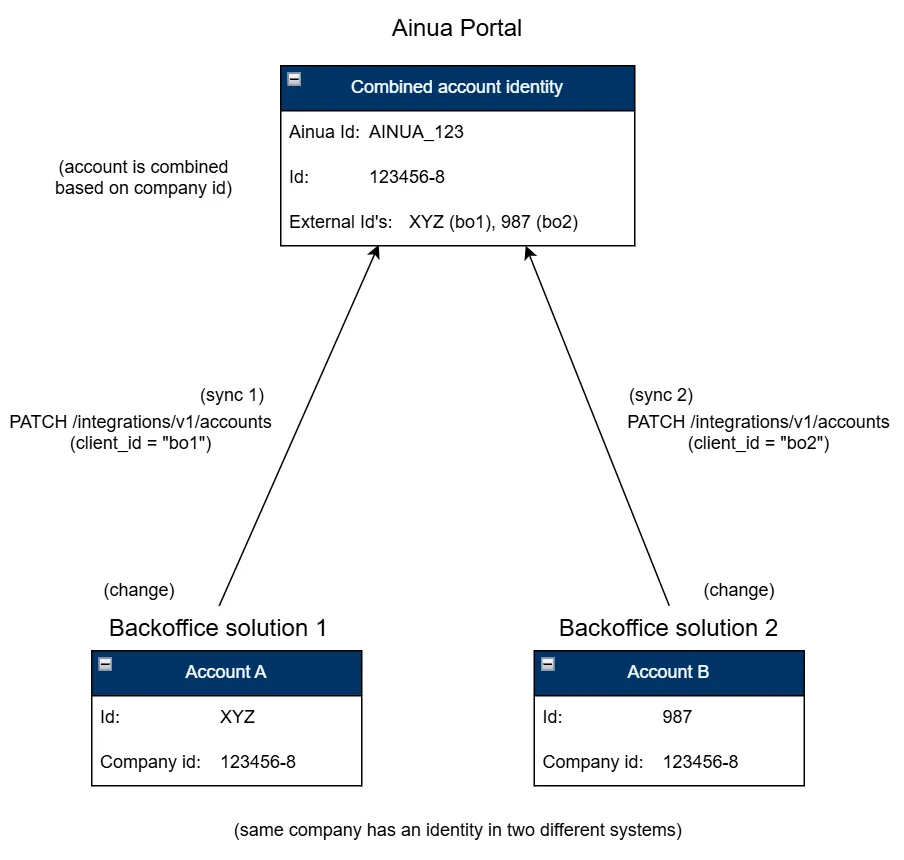
client_id is taken from the bearer_token obtained within authentication request using a specific connector in Ainua Portal. This is used for storing the user external identity in Ainua Portal. Good rule of thumb is to use different connector for each back-office integration.
Updating Accounts
Request
PATCH `https://{ainua_url}/api/integrations/v1/accounts`Header
Content-type: application/jsonAuthorization: Bearer {bearer_token}Body
{ "{account1_external_id}": { "name": "{account1_name}", "id":"{account1_id}" }, "{account2_external_id}": { "name": "{account2_name}", "id":"{account2_id}" }, :}Request will return 200 OK on success.
To remove an account provide null as account data.
{ "{accountX_external_id}": null, :}Example
Request
PATCH `https://example.ainuaportal.com/api/integrations/v1/accounts`Header
Content-type: application/jsonAuthorization: Bearer eyJhbGciOiJSUzI1Ni... ...PCBGj6DEN02WOIdzXEQBody
{ "account_123": { "name": "Acme Ltd.", "id": "123456-8" }}Response
HTTP/1.0 200 OKBinding users to an account
As described in Items API the data brought to Ainua Portal is always either non-targeted, or it is bound to an Account. A User gets access to the data, when his/her identity is bound to the Account. Ainua Portal makes sure to provide only the data User is entitled to.
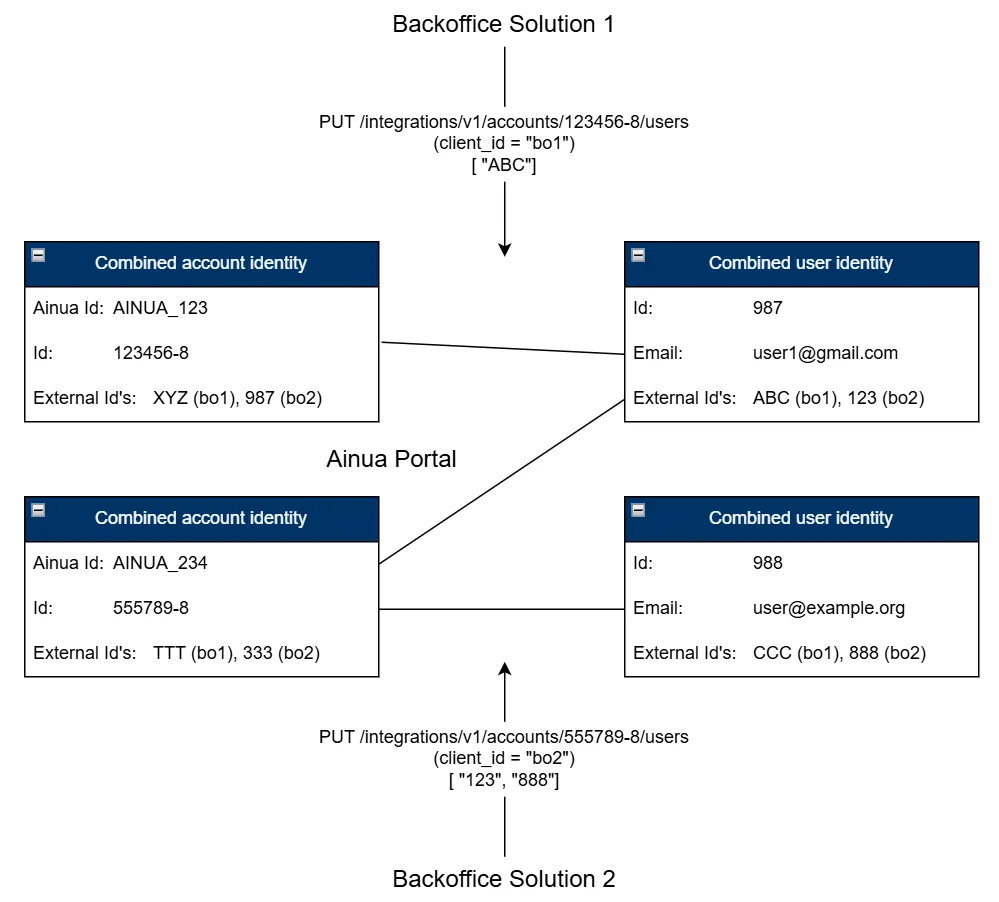
One user may be bound to many Accounts. When a user with multiple Account signs in to Ainua Portal client he/she is prompted to select one of the Accounts.
Request
PATCH `https://{ainua_url}/api/integrations/v1/accounts/{account_id}/users`Header
Content-type: application/jsonAuthorization: Bearer {bearer_token}Body
[ "user1_external_id", "user2_external_id", ... "userX_external_id"]Request will return 200 OK on success.
Example
Request
PATCH `https://example.ainuaportal.com/api/integrations/v1/accounts/123456-8/users`Header
Content-type: application/jsonAuthorization: Bearer eyJhbGciOiJSUzI1Ni... ...PCBGj6DEN02WOIdzXEQBody
[ "user_001", "user_002"]Response
HTTP/1.0 200 OK